Chapter 09
Apple Health
Four measurements in, one properly-shaped workout out. This chapter says exactly what crosses that line in each direction, because a fitness app asking for your body is owed a plain answer.
Connecting
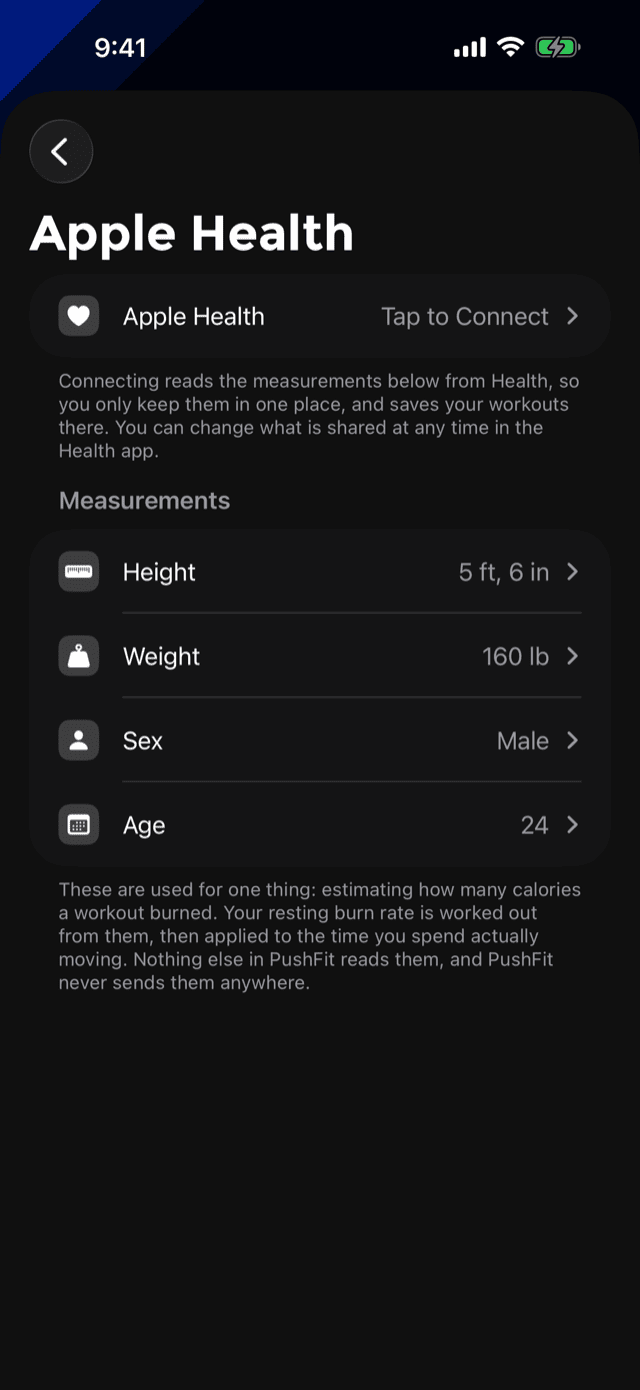
SettingsApple Health holds the connection and the four measurements behind it. The row at the top reads Tap to Connect, Connected or Not Connected, so the state is never a guess.
Connecting does two things, and the screen says so in as many words: it reads the measurements below from Health so you only keep them in one place, and it saves your workouts there.
PushFit cannot change what you have shared. That permission lives in Apple's Health app, which is the only place it can be edited, and PushFit points you there rather than pretending otherwise.
You never have to connect. Declining costs you the calorie estimate's accuracy and the Health record; everything else in PushFit works exactly the same.
What PushFit reads
Four values, and nothing else:
These are used for one thing: estimating how many calories a workout burned. Your resting burn rate is worked out from them, then applied to the time you spent actually moving. Nothing else in PushFit reads them, and PushFit never sends them anywhere.
If you would rather not connect Health at all, the same four values can be typed in by hand on that screen and they work identically. When they are coming from Health, PushFit will not let you overwrite them locally. It tells you to change them in the Health app, so there is only ever one true copy.
What PushFit writes
Every finished workout is saved as a Functional Strength Training workout, with:
- Its real start and end times.
- Active energy burned, as one sample per set rather than one lump for the session.
- One workout activity per set, each carrying the reps in that set as metadata.
That is the whole write. PushFit does not write step counts, heart rate, body measurements or anything else back into Health.
Why each set is its own activity
A push-up workout is interval work: short sets separated by rest. Stored as a single block, the rests drag the workout's average heart rate down toward resting and the shape of the session is lost entirely.
So PushFit hands HealthKit the set boundaries. Health can then tally each set's own statistics, and anything reading the workout back, including future versions of Apple's own tools, can see where the work actually happened. Each activity also carries the rep count for that set, which Apple's Fitness app ignores but other readers can use.
Where the calorie number comes from
It is an estimate, not a measurement, and PushFit says so on the screen where it appears.
The calculation, in order:
- Your resting burn rate is worked out from your age, sex, height and weight.
- That is multiplied by 6.91, the standard effort value for calisthenics.
- The result is applied to the time you were actually moving, not the whole workout. Resting does not burn at push-up rates, so it is not counted at push-up rates.
Which means the estimate is only ever as current as your measurements. If the number looks wrong, that screen is where to look first; the explanation on the Calories tile carries a button straight to it.
A measured number always wins. If an Apple Watch or an iPhone workout session actually measured your energy, PushFit uses that and does not add its own estimate on top. Billing the same push-ups twice would be worse than either number alone.
Heart rate
PushFit does not measure heart rate itself. It reads what a workout session recorded, which means:
- With an Apple Watch, the wrist runs the session and its heart rate flows into the workout. That is what produces the Heart Rate chart, the average and maximum tiles, and the Recovery number on the workout detail page.
- Without a watch, on iOS 26 and later, the iPhone can run a workout session of its own. That credits your activity rings properly, keeps health data readable while the phone is locked, and picks up heart rate from a connected Bluetooth monitor if you have one, which is where the live heart rate on the Live Activity comes from.
Heart rate is drawn in red everywhere it appears, on every theme, because it is the one number on those screens you did not produce. Every other fitness app on the phone draws it the same way, and in your accent colour it would read as another rep total.
Edits and deletions
Health samples cannot be changed in place. So when you correct a set or delete a workout, PushFit removes the stored Health workout and writes it again from the corrected sets. Without that, Health would keep quoting the reps and calories you had just fixed.
It only ever touches workouts it wrote itself. Nothing from another app is modified or deleted.
One workout, one record. When an Apple Watch is running the same session, the wrist owns the Health workout, because it has measured heart rate and measured energy rather than an estimate, and the phone discards its copy. That is why a set of push-ups never shows up twice in Health, and why an edit on the phone can always reach the record.