
Chapter 03
Goals, streaks & rest days
Four goals you can ignore entirely, a celebration that names what you actually did, and a streak built on the assumption that you will miss days, because everybody does.
Setting a goal
PushFit has four goals, one per period: Today, Week, Month and Year. All four ship switched off, and the app is designed to be complete without them. Turning one on is a choice, not a setup step.
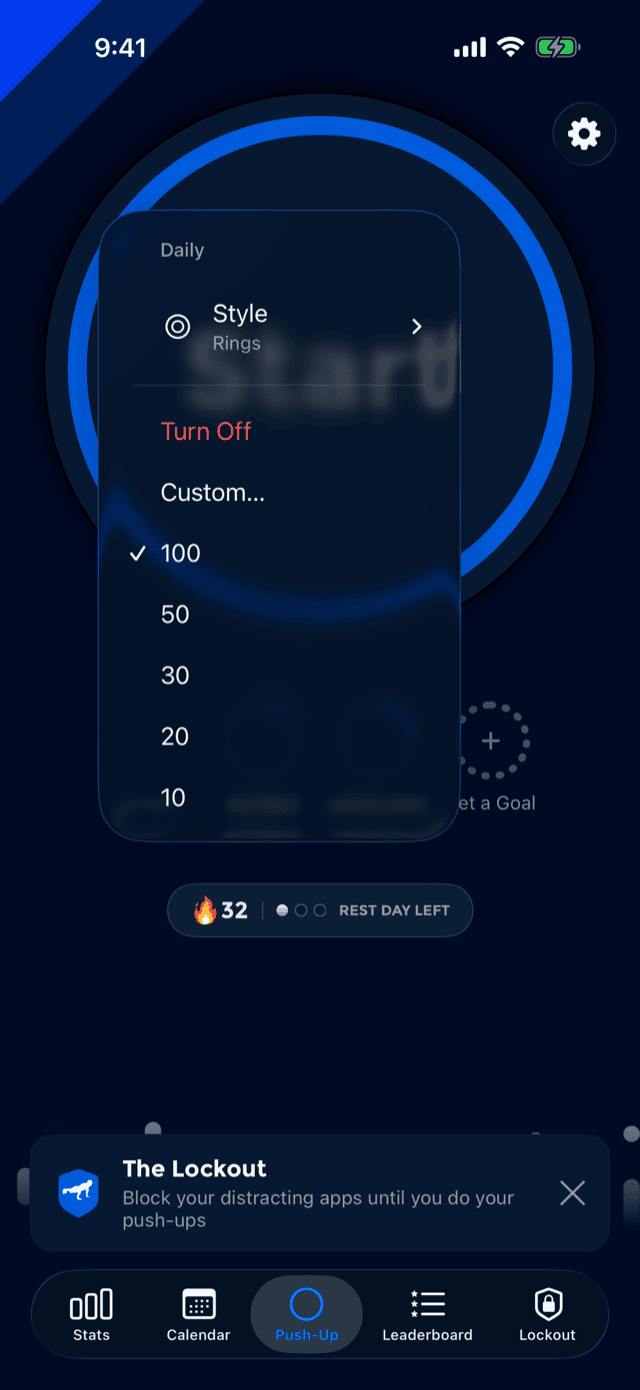
Every empty slot on the home screen is a dashed ring reading Set a Goal. Tap any slot, filled or empty, and a menu opens with suggested amounts, a Custom… field for typing your own, and Turn Off.
There is no goals screen buried in settings. The goal lives where its progress is drawn, so changing it is one tap from looking at it.
Progress is counted per calendar period in your own time zone: today's count resets at your midnight, the week at the start of your week, and so on. A goal met mid-workout fires confetti over the workout screen the instant it lands, rather than waiting for you to finish.
Rings or bars
The same goal menu carries a Style submenu with two options that change all four slots at once:
Rings Default
Activity-style arcs filling clockwise from the top. The house style: in PushFit effort is always a circle.
Bars
The same stroke and the same fill, straightened out. A length is easier to compare down a column of four, which is exactly what people who ask for bars are asking for.
This is the only place in PushFit where a ring becomes something else, and the choice deliberately lives in the goal menu rather than in Settings, next to the thing it changes.
The celebration
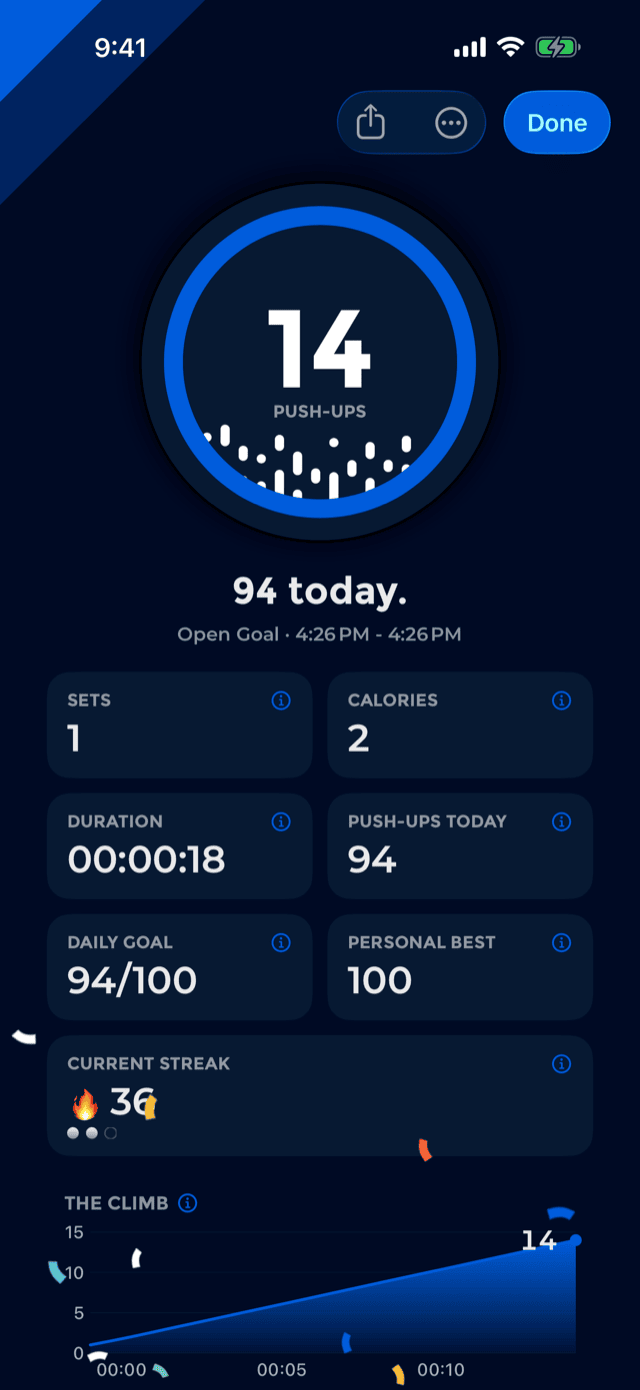
Ending a workout lands here. The headline names the best true thing about what just happened, in this order:
- New personal best. if the workout beat your all-time record.
- Goal complete. if it finished today's goal.
- “62 today.” otherwise, because the total is the point.
Under it is a short ledger. Every row can be tapped for an explanation of where the number came from:
Your music keeps playing, with the now-playing bar carried across. See More opens today in the calendar, and the menu in the corner offers sharing and deleting the workout you just did.
The screen closes on a verse, Philippians 4:13, in whichever language you are reading the app in.
The streak
Your streak is the number of consecutive days you trained. What makes it unusual is what happens on the days you do not.
In most apps a streak is a threat: miss a day and a number you have spent months building goes to zero. That works right up until the first time life gets in the way, and then it stops working forever. PushFit's streak is built to survive that day, without asking you to plan for it, buy anything, or remember to press a "rest day" button.
How rest days work
Three rules, and they are the whole model:
- Training earns recovery. Every day you do push-ups adds to a balance of rest days.
- A missed day spends it. A day with no push-ups quietly takes one rest day off the balance and your streak carries on, unbroken.
- The streak only breaks when the balance is empty. Miss a day with nothing banked and the chain snaps, visibly, on the calendar.
Nothing here is stored or scheduled. It is worked out fresh from your history every time the app asks, which means it can only ever be improved: the app is committed to loosening this model over time, never tightening it, because tightening would shrink somebody's streak while they slept.
How much you earn
The rate is set by how often you actually train, measured over the last four weeks, and how big your days usually are, measured as the median of the last eight weeks. Two consequences worth knowing:
- Training more often earns rest faster. The rate is calibrated so that keeping up your own usual frequency funds your own usual days off, with headroom on top so a consistent month slowly banks a buffer instead of merely breaking even.
- A bigger day earns more, but only up to a point. One heroic 400-rep afternoon does not buy a fortnight off. Beyond roughly double a normal day, extra reps stop adding recovery.
The balance is capped, at three rest days at the very most. A streak that survived two idle weeks would not mean anything, so it cannot.
Your goal cannot punish you. If you set an aspirational daily goal of 500 and reliably do 50, PushFit does not treat every day as a failure: the number used for recovery is capped near your own normal. Someone with no daily goal at all is on the primary path here, not a fallback, because all four goals ship switched off.
Brand new, or nearly
Two weeks of history and five training days are needed before PushFit trusts your own numbers; until then it works from sensible defaults. And for the first fourteen days after your very first workout, every missed day is covered outright. Nobody should open the app in week one to a broken streak.
What the number counts
The streak counts training days. A rest day keeps the chain alive but does not add to the number, so the figure always means work you did. The calendar draws the other view of this: an unbroken strand through the month, with a quiet bead on the days you rested and a visible break only where the chain truly ended.
The pips on the home screen
Under the goals sits one capsule: a flame with your streak, then a row of small dots. Each dot is a rest day you have in hand. Its caption says so explicitly: rest days left. Without that word a bare row of dots reads just as easily as days already taken.
It is a price tag, not advice. It reads the same whether you are safe or exposed, and it never suggests taking a day off. With no streak running there is no price to quote, so the capsule says nothing at all rather than nagging.
Tap it and PushFit explains the model rather than jumping somewhere; the explanation carries a button through to the calendar for anyone who wanted the chain instead.
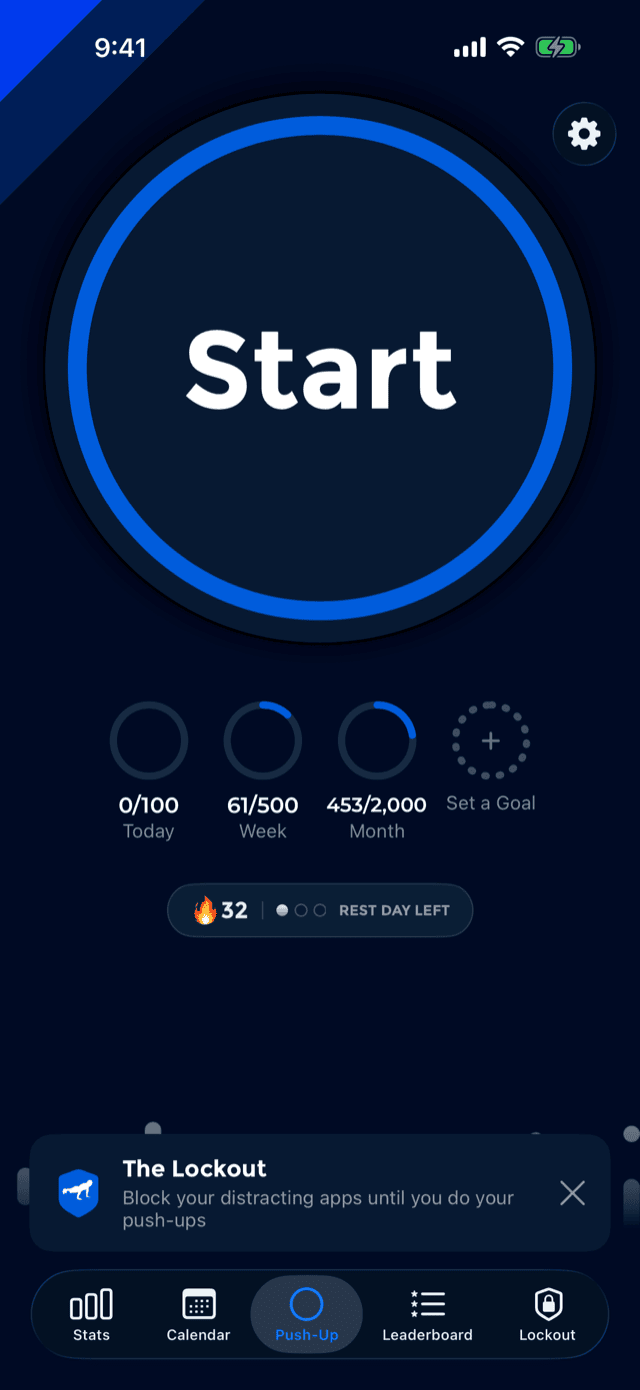
When you are down to your last one, PushFit says so on the day itself rather than after the fact. Open a rest day in the calendar with nothing left in the bank and it will tell you plainly that this was your last rest day.